Handle, wrapped-unit and plug context
Assembly process evidence
Small Appliance Assembly and Control-Panel Context
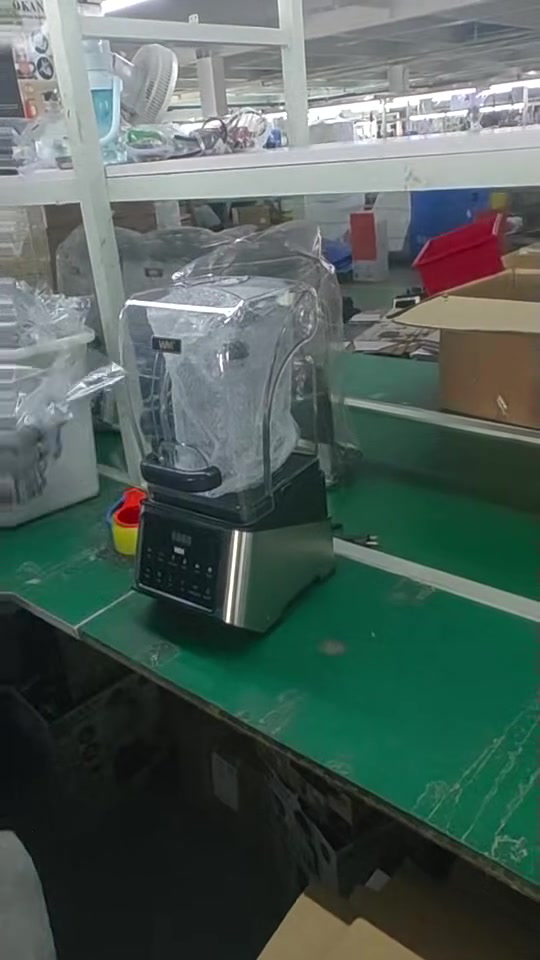
The primary clip shows blender-base control components, wires and base parts at a workstation; an operator handles a tool and visible components, positions a square base top cover, places a transparent container on the visible base and later illuminates the control panel. These are dated assembly-context observations, not proof of correct wiring or torque, a released BOM or component revision, firmware or UI, assembly completion, a function or electrical-safety pass, certification, compliance, inspection release or lot acceptance. Supporting clips below show glass-bowl appliance handling and plug geometry, separate control-panel operation with visible bench equipment and wider line activity. A linked dedicated watch page documents protective-bag application.
The footage does not prove that every Yaoyuan-supplied model or buyer order is assembled on this line. It does not establish current capacity, yield, inspection results or delivery. Exact order identity and evidence must be confirmed.
Featured clip next stepFootage captured 30 August 2026
Assembly and function-check views from the workshop
Each clip records a different visible operation at the time of filming. Product identity, component version, work instruction, test method and batch status still require order-matched records.
Control-panel context
Control-panel operation with visible bench equipment
A displayed reading is contextual evidence only; agreed limits, calibration, sampling and recorded results remain order specific. Next buyer step
Watch dedicated clip
Protective handling
Blender handling and protective-bag application at an assembly workstation
Watch the dated clip, then confirm the exact jar, base, electrical version, protective packing and approved accessories for the proposed SKU.Subassembly and line context
Open air-fryer housings, internal components and glass bowls at assembly workstations
The clip shows appliance housings during assembly, visible internal components, wiring, glass bowls and line handling. It does not show or prove injection molding, an exact order match, correct wiring or fastening, assembly completion, a passed check, capacity or shipment readiness. Next buyer stepProduct decision handoff
Connect visible assembly context to the right wholesale product route
The clips can help a buyer choose which product direction and order-control questions to review next. They do not identify an approved SKU, buyer order, production release, test pass, available capacity or delivery date.
Air fryer assembly review
Use the glass-bowl appliance handle and control-panel views to shortlist an air fryer direction, then confirm the exact model, approved sample, electrical version, work instruction and function-check basis.
Blender assembly review
Use the blender-base handling, protective-bag and workstation views to shortlist a blender direction, then confirm the exact model, jar and drive system, electrical version, approved sample and packing specification.
These routes organize the next buyer decision. Visible footage alone does not establish the exact factory-order relationship, model revision, quantity, inspection result, shipment release or commercial availability.
Evidence purpose
Turn workshop footage into an order-control question
An assembly video can show workplace context, product movement, parts staging and assembly activity. It is useful when the buyer connects what is visible to an exact model, approved sample, bill-of-material version, production batch and review date.
It cannot replace a purchase specification, production record, in-process inspection record, final inspection report, packing list or shipment release. Those records must be requested according to the buyer's risk and the confirmed order scope.
Function-check evidence boundary
What the Function-Check Footage Shows—and Does Not Prove
One clip shows a WM-branded appliance connected to bench equipment while the control panel is operated and numerical readings are visible. Another assembly view briefly shows a powered control panel. These are useful visual prompts for an importer reviewing in-process function checks.
A screen, power-on state or displayed reading is not a formal test result. Ask what exact function was checked, which written method and acceptance limits applied, which sample and voltage version were used, which instrument record and calibration validity apply, what result was recorded and how failed, held or retested units were handled.
Buyer control points
Six controls that make assembly evidence decision-ready
Order and model identity
Identify the purchase order, exact SKU, approved sample version, quantity and production stage. A general workshop video is not an order-specific record.
Parts and version status
Confirm the intended component, label, plug, cord, accessory, firmware or control-board version before assembly starts. Similar-looking parts are not automatically equivalent.
Station instruction
Define the critical operation, setting, tool or acceptance point at each relevant station. The buyer should know which controls depend on an operator and which require a recorded check.
In-process checks
Agree which appearance, fit, electrical, functional or safety-related checks occur during assembly and how exceptions are identified before packing.
Exception control
Nonconforming parts and units should be identified, segregated, reviewed and dispositioned. Rework must preserve the approved product version and agreed evidence trail.
Batch reconciliation
Reconcile started quantity, completed quantity, rejected or reworked units, packed quantity and final inspected quantity before shipment release.
Order evidence route
Connect assembly to the approved sample and shipment decision
1. Freeze the order version
Link the signed specification, approved sample, artwork, packing files and approved component decisions to the purchase order.
2. Confirm production readiness
Check material availability, exact component versions, work instructions, pilot results and unresolved deviations before bulk assembly.
3. Review dated progress
Use dated records tied to the order stage. Ask what is complete, what remains open and whether any substitution or corrective action is pending.
4. Control in-process exceptions
Record defects, causes, affected quantity, containment, rework and verification. Do not treat a general progress update as evidence that exceptions are closed.
5. Inspect the finished batch
Apply the agreed sampling and acceptance criteria to the final packed version before commercial release.
6. Reconcile before loading
Compare inspected quantity, packed quantity, carton marks, packing list and shipment details before container loading.
Strategic cooperation
Use local field evidence to improve the controlled product version
Buyer market evidence
Share real return reasons, service cases, installation errors, climate conditions, sales-channel feedback and competitor references from the destination market.
Yaoyuan coordination
Yaoyuan can coordinate the selected model, relevant supplier and component questions, samples, factory feedback, production follow-up, packing and inspection evidence within the confirmed project scope.
Joint decision
Review function, compliance, cost, lead time, packing, service and sell-through implications before approving a version change. No outcome is guaranteed without evidence.
Repeat-order continuity
Carry approved versions, deviations and corrective actions into replenishment files so later orders remain traceable to the buyer's accepted commercial version.
Continue verification
Use the assembly record with the rest of the order evidence
Approve the physical reference
Golden Sample Approval and Retention links the accepted product to specifications and future orders.
Control dated progress
Production Progress Control defines milestones, evidence, exceptions and change approval during production.
Verify the packing output
Packing and Finished-Carton Evidence connects inner protection, approved artwork, carton marks and packed quantity to the exact order.
Release the shipment
Pre-Shipment Inspection Control connects the finished batch to sampling, acceptance criteria and release.
Define air-fryer checks
Air Fryer Quality-Control Guide turns the model and destination risks into observable inspection points.
Define blender checks
Blender Quality-Control Guide covers the base, jar, lock, blade assembly, controls and packing questions for the selected version.
Set the sample basis
AQL Sampling and Inspection Plan separates a visible workshop check from the agreed batch sampling and accept-or-reject decision.
Build the complete evidence pack
Supplier Evidence Pack separates visible process context from exact-model and order-matched records.
Importer FAQ
How to read assembly and function-check footage
What does the small appliance assembly video show?
Footage captured on 30 August 2026 shows visible parts staging and manual assembly activity for blender bases, blender handling and protective-bag application, and glass-bowl appliance assemblies. Separate views show appliance housings, internal wiring, handle components, control-panel operation and visible bench equipment. Exact model, BOM version, batch identity and acceptance status require order-matched records.
Does an operating panel or meter reading prove the appliance passed testing?
No. A visible power-on state or numerical reading is contextual evidence only. It does not prove formal electrical safety, compliance, batch acceptance or shipment release. Confirm the test method, acceptance limits, sample identity, equipment record, calibration validity, recorded result and exception handling.
Does the plug close-up prove a country, voltage or compliance status?
No. The close-up shows two visible flat parallel blades only. It does not identify a verified plug standard, importing country, voltage, frequency, rated current, grounding construction, certification, compliance or market approval. Match the exact SKU, approved sample, released electrical version, rating label and model- and market-dependent documents.
Is the footage tied to my exact SKU or purchase order?
No. Match the footage to the purchase order, exact SKU, approved sample, BOM or component version, batch and filming date before using it as order evidence.
Does the footage prove current capacity, inventory or delivery?
No. The footage does not establish current capacity, stock, yield, completed quantity, inspection results, delivery timing or buyer order status.
Wholesale project brief
Identify the exact model, order version and assembly concern
Required inputs
Product or model direction, quantity, importing country, sales channel, plug and voltage, assembly concern, OEM packing scope and destination port.
Wholesale boundary
MOQ starts from 1000 PCS. Retail and one-piece orders are not supported. Model-specific minimums require confirmation.
Evidence boundary
Workshop footage supports due diligence. Exact order, factory, model, version, batch, inspection result, capacity and delivery remain subject to project confirmation.